
The Autonomous AI Merchandiser
The Autonomous AI Merchandiser is your merchandising on autopilot. Once a week it works through your whole store: it audits every collection for problems, acts on the ones it can fix, then hands you a report of exactly what it changed — and what those AI-built collections sold in the last 30 days. Think of it as a merchandiser who never sleeps and always shows their numbers. You can let it run on its own, or hit Run now any time.
1 Find the AI Merchandiser
The AI Merchandiser card sits at the top of your dashboard. Until its first run it shows a short intro; after a run it shows the latest report.

2 Run it now
Click Run now to trigger a cycle immediately. It audits every collection, takes any actions it's allowed to, and returns a fresh report in a few seconds. (It also runs on its own about once a week, so you don't have to remember to.)

3 Read the report
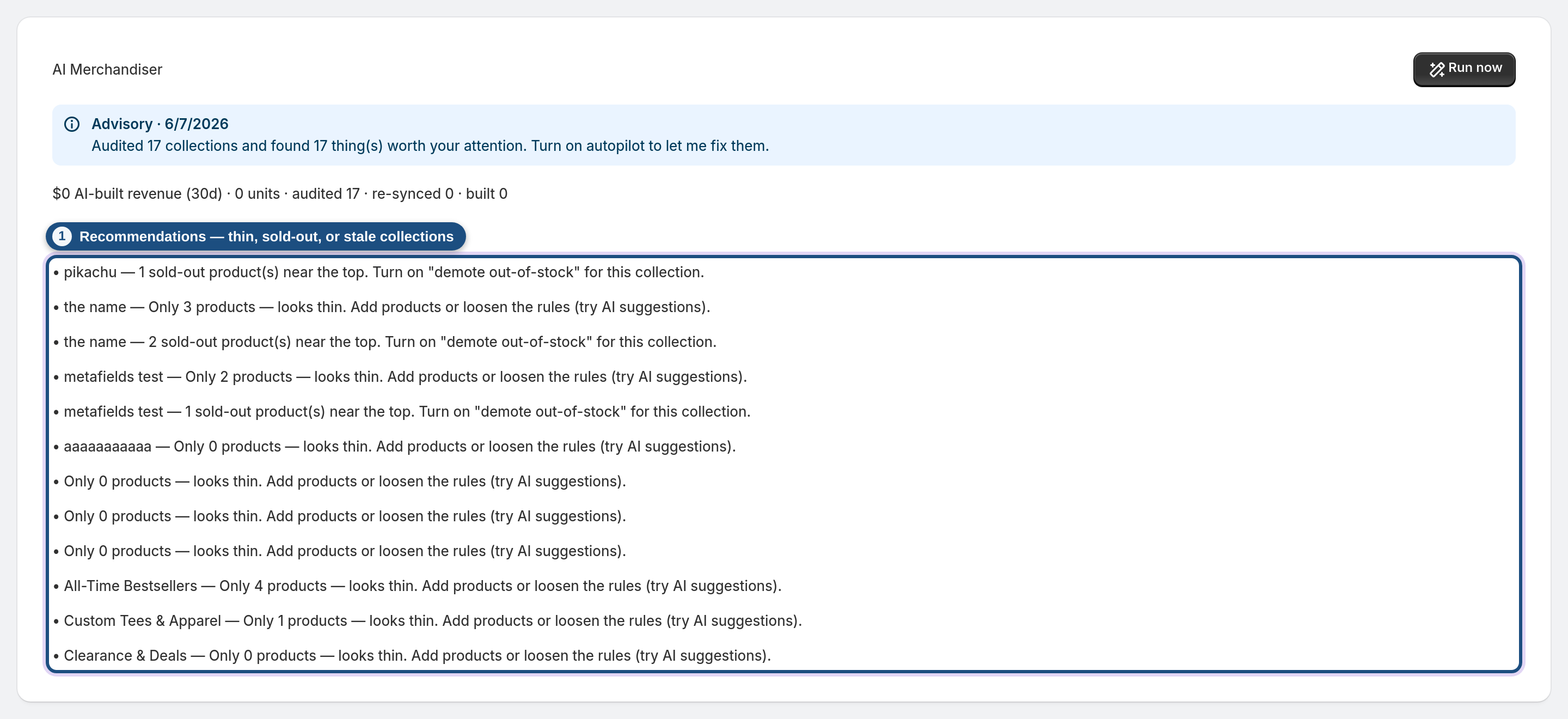
The report opens with a one-line summary and an impact line — AI-built revenue and units over the last 30 days, plus how many collections it audited, re-synced and built. That revenue figure is the point: it's what the AI actually earned you.

4 Review the recommendations
Below the summary is a list of recommendations — thin collections, sold-out products sitting near the top, collections that have gone stale — each with a suggested fix. In advisory mode the agent only recommends; it won't change anything without your say-so.
5 Turn on autopilot to let it act
In the Autopilot card, tick Autopilot — let the AI act on its own, set Minimum matched products and Max collections per run, and click Save. From then on the merchandiser stops just advising and starts acting: it re-syncs stale collections and auto-builds high-confidence suggested collections on every run. The report then shows what it did, not just what it found. Nothing is irreversible: every collection it builds has an Undo button in the AI Impact list that removes it again — and the merchandiser won't rebuild it.

Frequently asked questions
Does it change my store without asking?
Only if you turn on autopilot. With autopilot off it runs in advisory mode — it audits and recommends, but makes no changes.
How often does it run on its own?
About once a week per store. You can always trigger an extra run with Run now.
What does "AI-built revenue" mean?
It's the last-30-day units and revenue of the collections the AI created (from accepted suggestions) — a direct read on what the merchandiser is earning you.
What can it do automatically on autopilot?
Re-sync collections that have gone stale, and accept high-confidence collection suggestions into live, auto-updating collections — capped per run so it never floods your store.
Which plan includes it?
The AI Merchandiser is part of the AI toolkit on the Pro and Enterprise plans.
