
Shopify Collection Rules Reference: Metafield, Regex, Inventory and All 47 Properties
Every managed collection in Awsm Collections is built from rules, and every rule is the same three parts: a product property, a comparison operator and a value. The app gives you 47 properties and 20 operators, far more than the handful most guides mention, so you can match on metafields, SKUs, inventory, margin, sales or publish dates, or write a regex. This page is the reference: what each group of properties covers, what every operator does, and a few combinations merchants ask for. If you'd rather not write rules by hand, Create with AI (on every plan) writes them from a plain-English description, and you can still edit them using everything below.
Don't have Awsm Collections yet? Install it from the Shopify App Store →
1 How a rule is put together
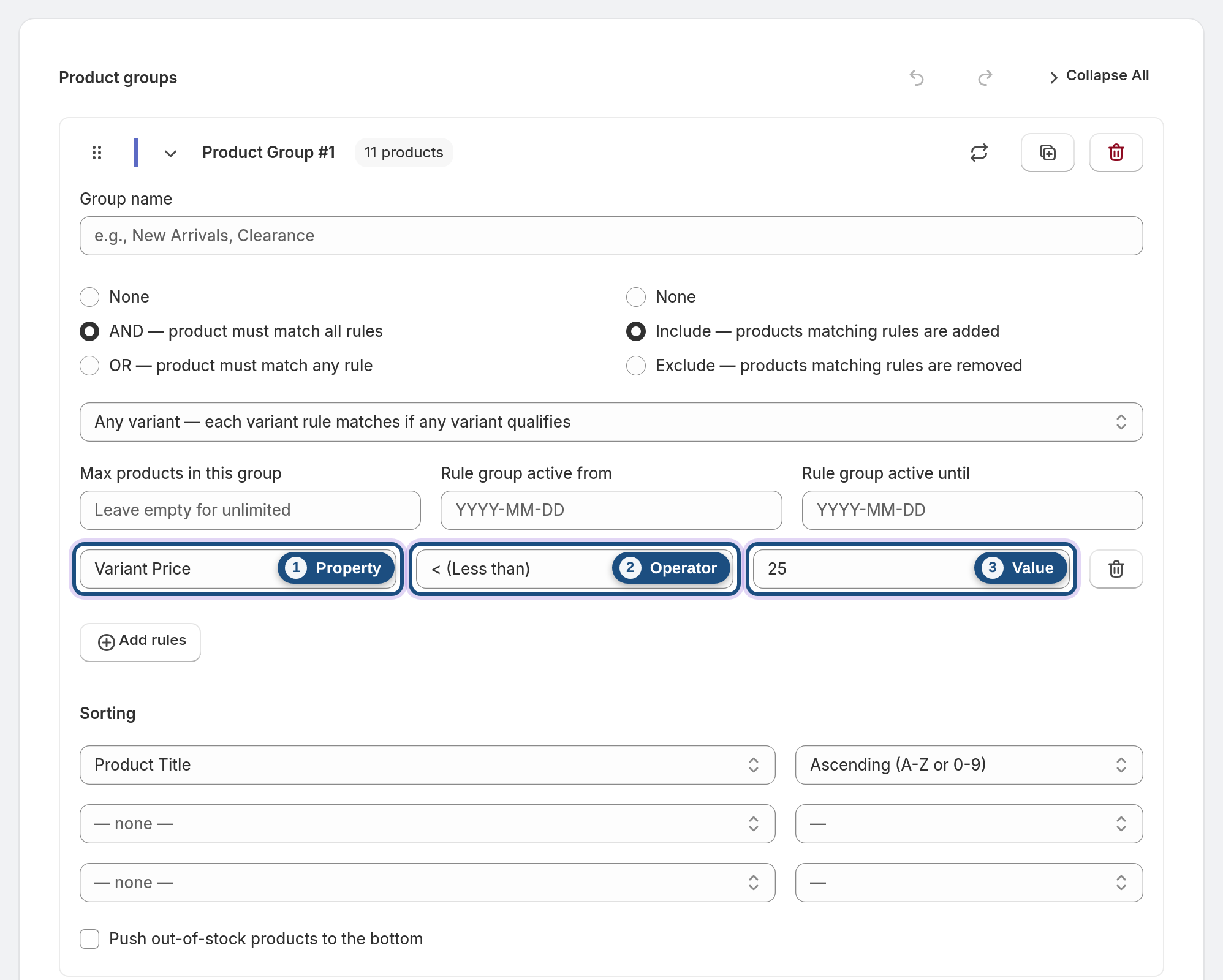
A rule reads like a sentence: Vendor equals Acme, Total inventory greater than 0, SKU matches regex ^SUMMER-. Rules live inside product groups, and within a group you combine them with AND (every rule must match) or OR (any rule can match).
Each group is set to Include or Exclude, and a collection can have several groups. When a product matches both, excludes win. For a walkthrough of creating groups, see Build a rule-based collection.
2 Product and catalog properties
These describe the product itself:
• Title, handle, description
• Type, vendor, tags, category
• Status and image count
• SEO title, SEO description and template suffix
• Metafields, so any data you keep in product metafields can drive a collection
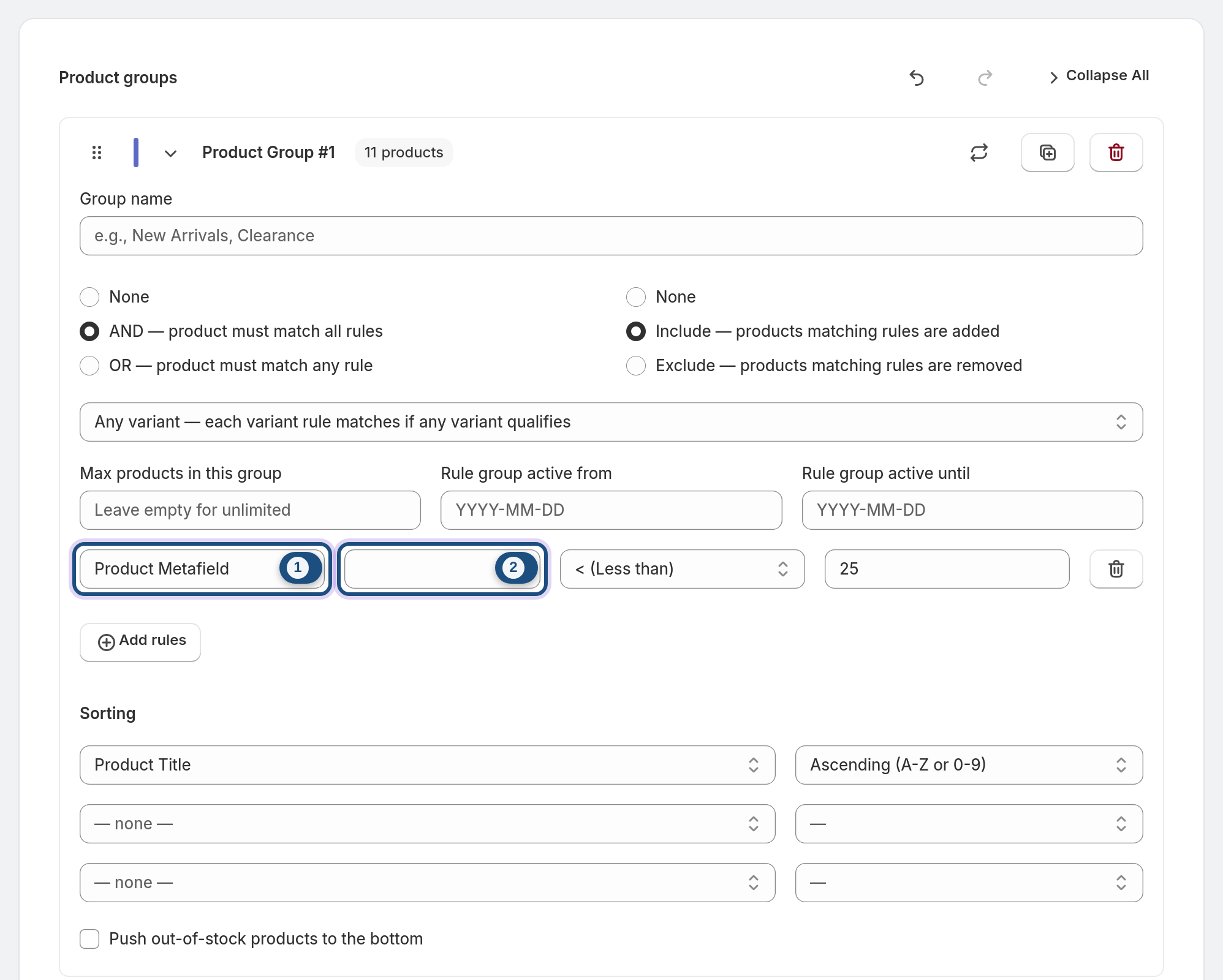
There is also in collection X, which lets you reuse an existing Shopify collection as a condition. Your existing collections are only read for this; the app doesn't change them. To use a metafield, choose Product Metafield as the property, then type the metafield as namespace.key (for example custom.material) in the box that appears next to it.
3 Variant, price and inventory properties
Variant-level properties: variant title, SKU, barcode, price, compare-at price, inventory quantity, cost per item, weight, options, requires shipping and taxable, plus the product's variant count.
Stock and availability: total inventory, inventory policy, inventory tracked, available for sale and on sale. Inventory policy and inventory tracked are checked per variant, like the variant properties above.
Because a product can have many variants, each group has a variant matching setting with three choices: any variant, same variant or all variants. It decides how variant-level rules are evaluated across a product's variants in a group set to AND. In an OR group each rule is checked on its own, so the setting has no effect.
4 Date, sales and margin properties
Dates: created date, updated date and published date. Pair them with in the last X days or more than X days ago to build new-arrival or older-stock collections that roll forward on their own.
Performance: units sold and revenue, each available as all-time, last 30 days, last 60 days and last 90 days, plus margin %. The app reads order data only to calculate these figures. All of this is on every plan.
5 AI-powered properties (Pro and Enterprise)
Two kinds of properties depend on the AI toolkit, which is part of the Pro and Enterprise plans only:
• Similar to product X matches products by meaning, using the app's product embeddings.
• AI facets: once the app has classified your catalog into store-specific facets such as style, occasion or material, those facets become rule properties too.
Facet values are saved as Shopify product metafields in the awsm_collections namespace, the only product data the app writes. See AI facets & the facet review.
6 All 20 comparison operators
Text and list matching:
• equals, contains, is one of, starts with, ends with, matches regex, and their negatives (for example does not contain)
Numbers, dates and blanks:
• greater than, less than, greater than or equal, less than or equal
• is between
• is empty and is not empty
• in the last X days and more than X days ago
In the rule editor the operators are labelled: = (Equals), Contains, Is one of, Starts with, Ends with, Matches regex, ≠ (Not equal), Does not contain, Is not one of, Does not start with, Does not end with, > (Greater than), ≥ (Greater than or equals), < (Less than), ≤ (Less than or equals), Is empty, Is not empty, Is between, In the last X days and More than X days ago.
7 Combinations merchants ask for
• New arrivals: Published date in the last X days 30, plus Total inventory greater than 0.
• SKU families: SKU matches regex with a pattern for your prefix, when starts with isn't flexible enough.
• Metafield-driven ranges: a metafield equals or is one of your values, with a second group set to Exclude for anything that should never appear.
• High-margin sellers: Margin % greater than your threshold AND units sold (last 30 days) greater than 0.
• Missing data clean-up: SEO description is empty or image count less than 2.
Add a max products cap or active from / active until dates on a group when a range should be limited or seasonal.
8 Use this reference with Bulk Actions
Bulk Actions applies one rule change to many selected collections: add a rule to all groups, remove rules that match a condition, or find-and-replace a value in existing rules. The property and operator names above tell you what to target.
In Bulk Actions, the Property and Relation fields take numeric IDs rather than names (for example 107 for Product Status and 10 for = (Equals)). You can look these up by opening Import, export & templates in the collection editor and clicking Export as JSON. Each run reports the result per collection. See Bulk-edit rules across many Shopify collections.

Frequently asked questions
Can I build a Shopify collection from a product metafield?
Yes. Metafields is one of the 47 rule properties, so a value stored in a product metafield can include or exclude products like any other condition. On Pro and Enterprise, the AI facets the app saves as metafields can also be used as rule properties.
Do collection rules support regex?
Yes. Matches regex is one of the 20 operators, and its negative is available too. It's useful for SKU, barcode, handle or title patterns that starts with, ends with or contains can't express.
How do I make a collection of products published in the last 30 days?
Use the published date property with the in the last X days operator and set X to 30. The collection re-syncs automatically on a schedule, so products drop out at the next sync after they pass 30 days. Add a total inventory or available for sale rule if you only want products in stock.
Which inventory conditions can I use?
Variant inventory quantity, total inventory, inventory policy, inventory tracked and available for sale. In an AND group, use the group's variant matching setting (any variant, same variant or all variants) to control how variant-level conditions are checked.
Is the similar to product rule on every plan?
No. Similar to product X needs the app's product embeddings and is part of the AI toolkit on the Pro and Enterprise plans. All other rule properties, including sales and margin, are available on every plan, except AI facet properties, which are also Pro and Enterprise only.
Do rules change my product data?
No. Rules only read product data to decide which products belong in a collection. The app doesn't edit titles, descriptions, prices, images or inventory. Its only product write is the AI facet metafields on Pro and Enterprise.